
Core Web Vitals Explained: A Complete Beginner’s Guide to LCP, INP & CLS in 2026
Your website may look great.
Your content may be useful.
Your SEO strategy may be strong.
But what happens when a visitor opens your website and the page takes too long to display, buttons respond slowly, or the content suddenly moves while they are trying to read it?
That’s where Core Web Vitals become important.
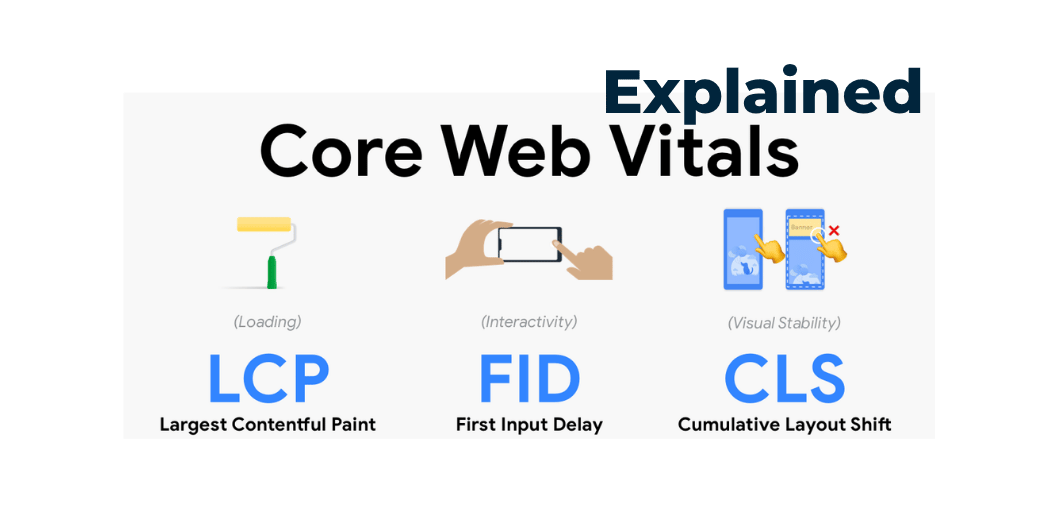
Core Web Vitals are a set of user-focused metrics used to evaluate important aspects of web page experience. The three current Core Web Vitals are:
- LCP — Largest Contentful Paint
- INP — Interaction to Next Paint
- CLS — Cumulative Layout Shift
Google’s current documentation identifies INP as a Core Web Vital, replacing FID. Google for Developers
Understanding these metrics is especially useful for business owners, SEO professionals, WordPress developers, and anyone responsible for website performance.
In this guide, we’ll explain Core Web Vitals in simple language and show you how to identify and improve common problems.
Read Also: How to Make Your Website Faster: 15 Proven Ways
What Are Core Web Vitals?
Core Web Vitals are metrics designed to measure important aspects of the experience users have when visiting a website.
They focus on three major questions:
1. Does the main content appear quickly?
That’s LCP.
2. Does the website respond quickly when users interact with it?
That’s INP.
3. Does the page remain visually stable?
That’s CLS.
Together, they provide a useful framework for thinking about website performance from the user’s perspective. Google describes LCP as measuring loading performance, INP as measuring responsiveness, and CLS as measuring visual stability. web.dev
Core Web Vitals at a Glance
| Metric | Measures | Good Target |
|---|---|---|
| LCP | Loading performance | ≤ 2.5 seconds |
| INP | Responsiveness | ≤ 200 ms |
| CLS | Visual stability | ≤ 0.1 |
These targets are evaluated at the 75th percentile, rather than simply looking at one individual visit. web.dev
Let’s understand each one.
1. What Is LCP?
Largest Contentful Paint
LCP measures how quickly the largest visible content element is rendered.
This is usually something important in the main visible area of the page, such as:
- A large hero image
- A headline
- A large text block
- A video poster image
The idea is simple:
How quickly does the main content become visible to the visitor?
A good LCP is 2.5 seconds or less for at least 75% of page visits. More than 4 seconds is considered poor. web.dev
LCP thresholds
| LCP | Result |
|---|---|
| ≤ 2.5 seconds | Good |
| 2.5–4 seconds | Needs improvement |
| > 4 seconds | Poor |
Why Is LCP Important?
Imagine a visitor opens your homepage.
The browser starts loading.
The header appears.
Then the visitor waits…
And waits…
The main hero section finally appears after several seconds.
Even though the website technically loaded, the visitor may feel that it is slow.
LCP focuses on when the primary visible content actually appears.
Common Causes of Poor LCP
Poor LCP can be caused by:
- Slow hosting
- High Time to First Byte (TTFB)
- Large hero images
- Render-blocking CSS
- Excessive JavaScript
- Poor caching
- Slow fonts
- Client-side rendering delays
- Multiple redirects
- Slow network conditions
Google’s guidance notes that high TTFB can make achieving a good LCP difficult, and that LCP should be considered as part of the complete loading process rather than simply an image-optimization problem. web.dev
How to Improve LCP
1. Improve hosting
A slow server can delay everything that follows.
2. Optimize your hero image
Compress large images and use appropriately sized files.
3. Avoid unnecessary redirects
Each additional redirect can introduce delay.
4. Improve caching
Use appropriate browser, server, or CDN caching.
5. Reduce render-blocking resources
Make sure important content can be displayed without unnecessary delays.
6. Optimize fonts
Avoid loading unnecessary font families and weights.
7. Reduce unnecessary JavaScript
Don’t make the browser process large amounts of JavaScript before displaying important content.
2. What Is INP?
Interaction to Next Paint
INP measures how responsive a page is when a visitor interacts with it.
Think about actions such as:
- Clicking a button
- Opening a menu
- Selecting a dropdown
- Typing into a form
- Adding an item to a cart
- Closing a popup
A website might load quickly but still feel slow if buttons take too long to respond.
That’s the type of experience INP helps evaluate.
INP became a Core Web Vital, replacing First Input Delay (FID). Google for Developers
Read Also: How to Choose the Right Web Hosting
INP Thresholds
| INP | Result |
|---|---|
| ≤ 200 ms | Good |
| 200–500 ms | Needs improvement |
| > 500 ms | Poor |
Google recommends evaluating INP at the 75th percentile of page visits, segmented across mobile and desktop. web.dev
Why Does INP Matter?
Imagine visiting an online store.
You click:
“Add to Cart.”
But nothing seems to happen.
You click again.
Still nothing.
Then suddenly the cart updates.
The website technically works—but the experience feels slow.
That’s a responsiveness problem.
INP helps developers identify this type of issue.
Common Causes of Poor INP
One major cause is excessive JavaScript work.
Problems may include:
- Large JavaScript bundles
- Long-running tasks
- Excessive third-party scripts
- Heavy animations
- Poorly optimized event handlers
- Complex page builders
- Too much client-side processing
How to Improve INP
Reduce unnecessary JavaScript
Only load scripts that are actually required.
Break up long tasks
Don’t make the browser process huge amounts of work in one go.
Optimize event handlers
Buttons, menus, forms, and interactive components should respond efficiently.
Reduce third-party scripts
Analytics, chat widgets, advertising tools, and other integrations can add processing work.
Avoid excessive animations
Animations should improve the experience—not make the interface sluggish.
3. What Is CLS?
Cumulative Layout Shift
CLS measures visual stability.
Have you ever tried to click a button and, just before you click, an advertisement or image loads and pushes the button somewhere else?
That’s a layout shift.
CLS helps measure these unexpected movements.
A good CLS score is 0.1 or less, while a score above 0.25 is considered poor. web.dev
CLS Thresholds
| CLS | Result |
|---|---|
| ≤ 0.1 | Good |
| 0.1–0.25 | Needs improvement |
| > 0.25 | Poor |
Common Causes of Poor CLS
Some common causes include:
- Images without defined dimensions
- Ads without reserved space
- Dynamically inserted content
- Web fonts changing layout
- Popups appearing unexpectedly
- Banners loading after the page
- Embedded content changing size
Google specifically identifies images, ads, embeds, dynamically injected content, and web fonts among common causes of layout shifts. web.dev
How to Improve CLS
Define image dimensions
Tell the browser how much space an image requires.
Reserve space for advertisements
Don’t allow ads to suddenly push existing content downward.
Reserve space for embeds
For videos, maps, social posts, and other embedded elements, plan their dimensions.
Avoid inserting content above existing content
If content suddenly appears above what the visitor is reading, the layout can shift.
Optimize fonts
Poorly handled web fonts can cause text to move when a different font loads.
LCP vs INP vs CLS
The easiest way to understand Core Web Vitals is:
LCP
“How quickly does the main content appear?”
INP
“How quickly does the website respond when I interact with it?”
CLS
“Does the page stay where it is while I use it?”
Think of a restaurant:
LCP: How quickly does your meal arrive?
INP: How quickly does the waiter respond when you ask for something?
CLS: Does the table suddenly move while you’re eating?
Different problems—but all affect the overall experience.
Are Core Web Vitals an SEO Ranking Factor?
Core Web Vitals are part of Google’s page experience considerations, but good Core Web Vitals scores do not guarantee higher search rankings.
SEO involves many factors, including:
- Content relevance
- Search intent
- Technical SEO
- Website structure
- Internal linking
- Page experience
- Authority
- Mobile usability
- Quality and usefulness of content
So don’t think:
“If I get 100 on PageSpeed Insights, I’ll automatically rank #1.”
That’s not how SEO works.
A fast website is valuable because it creates a better user experience and provides a stronger technical foundation—not because one score guarantees rankings.
Field Data vs Lab Data
This is one of the most important concepts to understand.
Performance tools can provide different types of data.
Lab Data
Lab testing uses a controlled testing environment.
It is useful for:
- Debugging
- Development
- Identifying problems
- Comparing changes
Field Data
Field data comes from real users and real browsing conditions.
Users may have:
- Different devices
- Different internet connections
- Different locations
- Different browsers
- Different hardware
This means your website can perform differently for different visitors.
Core Web Vitals assessments commonly use the 75th percentile of page visits. web.dev
Read Also: On-Page SEO Checklist: 15 Proven Techniques to Rank Higher on Google
Why Mobile Performance Matters
A website that feels fast on a powerful desktop computer may behave differently on a mobile device.
Mobile users can experience:
- Slower networks
- Less powerful processors
- Smaller screens
- Higher latency
- Different browser behavior
That’s why website performance should be tested on mobile as well as desktop.
For a business targeting customers in India, this is particularly important because your audience may access your website through a wide range of devices and network conditions.
How to Check Your Core Web Vitals
You don’t have to guess whether your website has performance problems.
Useful tools include:
Google PageSpeed Insights
A convenient starting point for checking individual pages.
Google Search Console
Useful for monitoring Core Web Vitals reports across your website when sufficient field data is available.
Chrome DevTools
Useful for developers who want to investigate specific performance problems.
Lighthouse
Useful for controlled performance testing and audits.
Chrome UX Report
Useful for understanding real-world user experience data where available.
What Should You Fix First?
If your website has problems with all three metrics, don’t try to fix everything simultaneously.
Start with the biggest issues.
If LCP is poor:
Focus on:
- Hosting
- TTFB
- Hero images
- Caching
- Render-blocking resources
- Critical content
If INP is poor:
Focus on:
- JavaScript
- Long tasks
- Third-party scripts
- Event handlers
- Heavy interactive components
If CLS is poor:
Focus on:
- Image dimensions
- Ads
- Embeds
- Dynamic content
- Fonts
- Popups
Core Web Vitals for WordPress Websites
WordPress websites can perform very well, but performance depends on how the website is built and maintained.
Start with your hosting
A reliable hosting environment provides a strong foundation.
Optimize images
Don’t upload unnecessarily large files.
Use caching
Configure caching appropriately.
Review plugins
Remove unnecessary or problematic plugins.
Use a performance-conscious theme
Avoid unnecessary features and scripts.
Optimize JavaScript
Reduce unnecessary frontend processing.
Check page builders
Complex layouts can sometimes generate additional markup and scripts.
Monitor changes
Test the website after major updates.
Core Web Vitals for WooCommerce
eCommerce websites can face additional performance challenges because they often contain:
- Product images
- Filters
- Search
- Cart functionality
- Checkout
- Payment integrations
- Customer sessions
- Marketing scripts
For WooCommerce stores, don’t focus only on the homepage.
Test important pages such as:
- Category pages
- Product pages
- Cart
- Checkout
- Search
- Landing pages
A fast homepage doesn’t automatically mean your entire store is fast.
10 Practical Ways to Improve Core Web Vitals
Here’s a quick action list:
1. Use reliable hosting
Improve server response and resource availability.
2. Compress images
Reduce unnecessary image weight.
3. Use appropriate image dimensions
Don’t serve massive images where small ones are sufficient.
4. Enable caching
Reduce repeated processing and downloads.
5. Use a CDN where appropriate
Deliver cached static resources efficiently.
6. Reduce unnecessary JavaScript
Less browser processing can improve responsiveness.
7. Optimize third-party scripts
Keep only the integrations that provide real value.
8. Reserve space for images and embeds
Prevent unexpected layout movement.
9. Optimize fonts
Reduce unnecessary font files and layout changes.
10. Monitor real-world performance
Don’t optimize once and forget about it.
Common Core Web Vitals Mistakes
Mistake 1: Chasing a Perfect Score
A 100/100 score isn’t the purpose of website optimization.
Focus on real user experience.
Mistake 2: Optimizing Only the Homepage
Your important service, product, blog, and landing pages also need attention.
Mistake 3: Looking Only at Desktop
Mobile users matter.
Mistake 4: Ignoring Real-World Data
A local lab test doesn’t represent every visitor.
Mistake 5: Fixing Symptoms Instead of Causes
Installing another optimization plugin may not solve the underlying problem.
Mistake 6: Making Too Many Changes at Once
Change one area, test it, measure the result, and then continue.
A Simple Core Web Vitals Action Plan
If you’re a small business owner and technical SEO isn’t your specialty, use this simple process.
Step 1: Test your important pages
Check your homepage, main service pages, product pages, and key landing pages.
Step 2: Record the problems
Write down your LCP, INP, and CLS results.
Step 3: Identify the largest issue
Don’t try to optimize everything simultaneously.
Step 4: Fix the underlying cause
For example:
Poor LCP → large hero image + slow server
rather than simply installing another plugin.
Step 5: Test again
Compare the results.
Step 6: Monitor over time
Performance can change when you add:
- New plugins
- Images
- Tracking scripts
- Popups
- Marketing tools
- New website features
Read Also: WordPress vs Custom Website
Core Web Vitals Checklist
Use this checklist when reviewing your website:
- LCP is ≤ 2.5 seconds
- INP is ≤ 200 ms
- CLS is ≤ 0.1
- Images are optimized
- Image dimensions are defined
- Hosting is reliable
- Caching is configured
- Unnecessary JavaScript is removed
- Third-party scripts are reviewed
- Fonts are optimized
- Ads and embeds have reserved space
- Mobile performance is tested
- Important pages are tested
- Field data is monitored
- Performance is checked after major updates
Frequently Asked Questions
What are the three Core Web Vitals in 2026?
The current Core Web Vitals are LCP, INP, and CLS. LCP measures loading performance, INP measures responsiveness, and CLS measures visual stability. Google for Developers
What is a good LCP score?
A good LCP is 2.5 seconds or less at the recommended 75th-percentile threshold. Above 4 seconds is considered poor. web.dev
What is a good INP score?
A good INP is 200 milliseconds or less. More than 500 milliseconds is considered poor. web.dev
What is a good CLS score?
A good CLS score is 0.1 or less, while a score above 0.25 is considered poor. web.dev
Does Core Web Vitals affect SEO?
Core Web Vitals are part of Google’s page experience considerations, but good scores alone don’t guarantee higher rankings.
Can WordPress achieve good Core Web Vitals?
Yes. WordPress websites can achieve good Core Web Vitals when hosting, themes, plugins, images, JavaScript, caching, and other performance factors are properly managed.
Do I need a 100/100 PageSpeed score?
No. A perfect laboratory score isn’t the objective. Focus on delivering a fast, responsive, and stable experience to real users.
How often should I check Core Web Vitals?
Check them periodically and after significant website changes such as theme updates, plugin installations, redesigns, new tracking scripts, or major content changes.
Conclusion
Core Web Vitals make website performance easier to understand by focusing on three important aspects of the user experience:
LCP → Loading
INP → Responsiveness
CLS → Stability
The recommended targets are:
LCP ≤ 2.5 seconds
INP ≤ 200 milliseconds
CLS ≤ 0.1
These measurements are evaluated using the 75th percentile, so the goal isn’t to make one test look perfect. The goal is to provide a consistently good experience for a large majority of your visitors. web.dev
If your website isn’t performing well, don’t panic.
Start with the biggest problems.
Optimize your images.
Improve your hosting.
Reduce unnecessary JavaScript.
Use caching.
Reserve space for content.
Test mobile performance.
And monitor real-world results over time.
A fast, responsive, and stable website is not just a technical achievement—it is a better experience for your customers.






3 Comments