
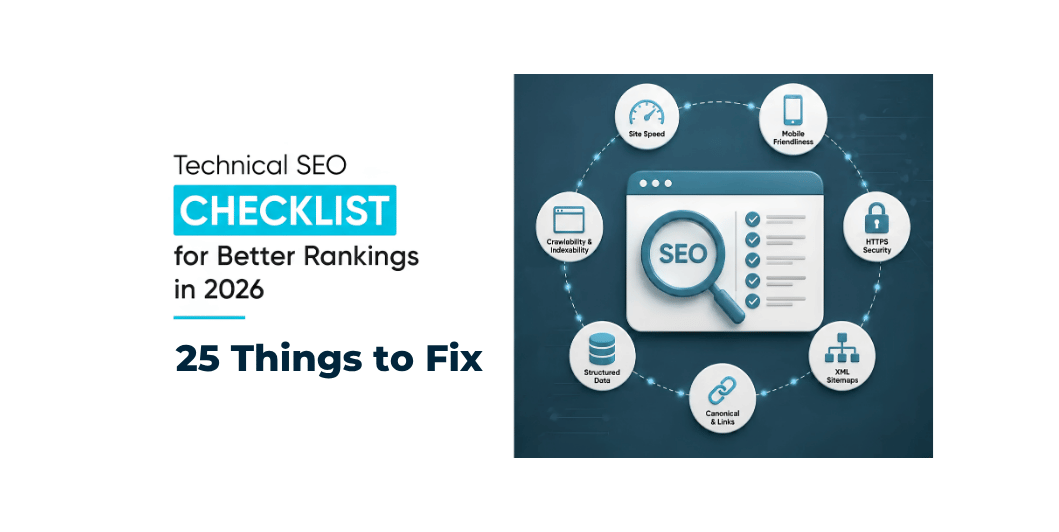
Technical SEO Checklist: 25 Things to Fix on Your Website in 2026
You can publish excellent content and target the right keywords, but your SEO strategy can still struggle if search engines have difficulty crawling, understanding, or indexing your website.
That’s where technical SEO comes in.
Technical SEO is the process of improving the technical foundation of your website so that search engines can access, understand, and process your pages effectively.
Google’s technical requirements are relatively straightforward: Googlebot must be able to access the page, the page should return a successful HTTP status, and it needs indexable content. Meeting those requirements makes a page eligible for indexing, but does not guarantee that Google will index or rank it.
In today’s guide, we’ll cover 25 technical SEO checks you can use for a business website, WordPress website, blog, or eCommerce store.
Read Also: Core Web Vitals Explained
What Is Technical SEO?
Technical SEO focuses on the parts of SEO that are related to your website’s infrastructure and accessibility.
It includes areas such as:
- Crawling
- Indexing
- Website architecture
- URLs
- HTTPS
- XML sitemaps
- Robots.txt
- Canonical URLs
- Mobile usability
- Website speed
- Core Web Vitals
- Structured data
- Redirects
- Broken links
- JavaScript rendering
- Internal linking
Think of it this way:
Content SEO tells Google what your page is about.
Technical SEO helps Google access and process that page.
Both matter.
The 25-Point Technical SEO Checklist
Let’s go through each item.
1. Make Sure Your Website Uses HTTPS
Your website should use HTTPS rather than HTTP.
HTTPS helps protect the connection between your visitors and your website.
Check that:
- Your website loads using HTTPS
- HTTP versions redirect appropriately
- Your SSL/TLS certificate is valid
- Internal links use HTTPS
- Images and scripts aren’t unnecessarily loaded over HTTP
Google recommends HTTPS for website security and user experience.
Checklist
http://example.com → https://example.com
2. Check Whether Google Can Access Your Website
Search engines need to be able to access your pages.
Make sure you aren’t accidentally blocking important pages through:
- robots.txt
- Login requirements
- Server restrictions
- Firewall settings
- Incorrect noindex directives
Google’s technical requirements specifically state that Googlebot must not be blocked from accessing the page.
3. Check Your Robots.txt File
The robots.txt file provides crawling instructions to search-engine crawlers.
A typical website may have:
yourdomain.com/robots.txt
Check that important sections of your website aren’t accidentally blocked.
For example, don’t accidentally prevent crawlers from accessing:
- Blog posts
- Service pages
- Product pages
- Important images
- CSS/JavaScript resources required for rendering
Important:
robots.txt is primarily for controlling crawling, not for removing a URL from Google’s index.
If you want a page excluded from indexing, noindex is generally the appropriate mechanism when Google can crawl the page.
4. Create and Maintain an XML Sitemap
An XML sitemap helps search engines discover important URLs on your website.
A sitemap commonly looks like:
yourdomain.com/sitemap.xml
or may be generated through an SEO plugin.
Your sitemap should generally contain the URLs you actually want search engines to consider.
For a business website, this might include:
- Homepage
- Service pages
- Important blog posts
- Product pages
- Category pages where appropriate
Google notes that sitemaps can help it discover URLs, but submitting a sitemap does not guarantee crawling or indexing.
5. Submit Your Sitemap to Google Search Console
After creating your sitemap, submit it through Google Search Console.
This gives Google a clear location for your sitemap and allows you to monitor sitemap-related information.
Remember:
Sitemap submission ≠ guaranteed indexing.
Google determines which URLs it crawls, indexes, and serves in search results.
6. Check Your Indexing Status
One of the most important technical SEO questions is:
Are my important pages actually indexed?
You can use Google Search Console’s Page Indexing report to identify problems.
You can also perform a basic search such as:
site:yourdomain.com
However, Google notes that the site: operator doesn’t necessarily show every indexed URL, so it shouldn’t be treated as a complete index report.
7. Use the URL Inspection Tool
Google Search Console’s URL Inspection tool allows you to investigate individual URLs.
You can use it to understand whether Google can access and process a particular page.
It’s especially useful when:
- A new page isn’t appearing in search
- A page was recently updated
- You suspect indexing problems
- You changed important technical elements
Google recommends URL Inspection for testing whether Google can find and access specific pages.
8. Check Your HTTP Status Codes
Your important pages should normally return a successful response.
A normal page should generally return:
200 OK
Be careful with:
- 404 errors
- 500 errors
- 502 errors
- 503 errors
- Incorrect redirects
A technically broken page cannot provide a useful experience to users or search engines.
Google’s technical requirements specifically identify a successful HTTP response as one of the minimum requirements for indexing.
9. Find and Fix Broken Links
Broken internal links can create a poor user experience and make your website harder to navigate.
Check for links pointing to:
- Deleted pages
- Incorrect URLs
- Old URLs
- Misspelled URLs
- Non-existent resources
For example:
yourdomain.com/services/seo
shouldn’t unexpectedly lead to a 404 if the page has been moved.
10. Manage 301 Redirects Properly
When you permanently move a page, a 301 redirect can help direct visitors and search engines from the old URL to the relevant new URL.
Avoid unnecessary redirect chains.
For example:
Old URL → Redirect 1 → Redirect 2 → Final URL
is less efficient than:
Old URL → Final URL
Keep your redirects clean and intentional.
11. Check Canonical URLs
Canonical tags help communicate which URL should be treated as the preferred version when similar or duplicate URLs exist.
For example:
/product/product?color=red/product?sort=price
may potentially create multiple URL variations.
A properly implemented canonical strategy can help search engines understand the preferred version.
Canonicalization is part of Google’s broader crawling and indexing guidance.
12. Avoid Duplicate or Near-Duplicate Pages
Duplicate content isn’t simply a penalty waiting to happen.
The bigger technical concern is that multiple URLs can make it harder for search engines to determine which version is the most useful or canonical.
Look for:
- Duplicate service pages
- Multiple URL parameters
- Duplicate product pages
- Printer-friendly URLs
- Tag/archive duplicates
- HTTP/HTTPS duplication
- www/non-www variations
Create clear URL and canonicalization rules.
13. Make Your Website Mobile-Friendly
Google uses the mobile version of a site’s content for indexing and ranking under mobile-first indexing.
Your website should work properly on:
- Smartphones
- Tablets
- Laptops
- Desktop computers
Check:
- Font size
- Navigation
- Buttons
- Forms
- Images
- Tables
- Popups
- Horizontal scrolling
Don’t design your website only for desktop users.
14. Improve Core Web Vitals
Core Web Vitals focus on three important user-experience areas:
LCP
Largest Contentful Paint — loading performance.
INP
Interaction to Next Paint — responsiveness.
CLS
Cumulative Layout Shift — visual stability.
Our previous article covers these metrics in detail:
Core Web Vitals Explained: A Complete Beginner’s Guide to LCP, INP & CLS in 2026
Use Search Console and performance testing tools to monitor them.
Google recommends using the Core Web Vitals report and PageSpeed Insights to assess performance.
Read Also: How to Make Your Website Faster
15. Improve Website Speed
Website speed isn’t only about SEO.
It affects how visitors experience your business.
Review:
- Hosting
- Image sizes
- Caching
- JavaScript
- CSS
- Fonts
- Plugins
- Third-party scripts
- CDN usage
Our previous guide covers this in detail:
How to Make Your Website Faster: 15 Proven Ways to Improve Website Speed in 2026
16. Create a Logical Website Structure
Your website architecture should make sense to both users and search engines.
For example:
Home
→ Services
→ SEO Services
→ Local SEO
→ Local SEO Guide
This creates a logical relationship between topics.
A clear structure also makes internal linking easier.
17. Improve Internal Linking
Internal links connect one page of your website to another.
They can help users discover related content and help search engines understand relationships between pages.
For example, this blog post can link to:
Technical SEO
→ Core Web Vitals
→ Website Speed
→ WordPress
→ SEO
Instead of publishing isolated articles, build connected topic clusters.
18. Use Descriptive URLs
Good URLs should be:
- Short
- Descriptive
- Readable
- Relevant to the page
For example:
Good:
example.com/technical-seo-checklist
Less useful:
example.com/page?id=4589
Avoid changing URLs unnecessarily after a page has gained traffic or links.
19. Optimize Page Titles and Meta Descriptions
Technical SEO isn’t completely separate from on-page SEO.
Every important page should have a useful title.
For example:
Technical SEO Checklist: 25 Things to Fix in 2026
is much more informative than:
Home
or
Page 123
Meta descriptions can help communicate what a page is about and can influence how your result is presented in search, although Google may generate snippets differently depending on the query.
20. Use Structured Data Where Appropriate
Structured data provides search engines with additional information about the content of a page.
Depending on the content, structured data may help Google understand things such as:
- Articles
- Products
- Events
- Organizations
- Breadcrumbs
- Local businesses
- Other supported content types
However, structured data does not guarantee rich results.
Use only markup that accurately represents the content on the page.
Google provides documentation for structured data and supported search features.
21. Check JavaScript Rendering
Modern websites often rely heavily on JavaScript.
JavaScript isn’t automatically bad for SEO.
The important question is:
Can search engines access and understand the important content?
Google explains that its systems render pages and process JavaScript, but websites should still ensure important content and resources are accessible.
Check that important:
- Text
- Links
- Images
- Navigation
- Product information
aren’t unnecessarily dependent on problematic client-side rendering.
22. Optimize Images for SEO
Technical image optimization includes more than reducing file size.
Check:
- File size
- Dimensions
- Format
- Alt text
- File names
- Responsive delivery
- Lazy loading where appropriate
For example:
bad filename:
IMG_48392.jpg
Better:
technical-seo-checklist.jpg
Use alt text when it helps describe an image’s purpose or content.
23. Create a Useful 404 Page
Visitors will eventually reach a URL that doesn’t exist.
Instead of showing a confusing blank page, provide a useful 404 page.
Include:
- Clear explanation
- Link to homepage
- Search option if useful
- Important navigation
- Links to popular sections
A good 404 page helps visitors recover instead of leaving immediately.
24. Check Your Website Security
Security should be part of your technical SEO foundation.
Check:
- HTTPS
- WordPress updates
- Plugin updates
- Theme updates
- Strong passwords
- Administrator permissions
- Backups
- Malware monitoring
- Secure hosting
Google recommends HTTPS as part of good website security and user experience.
25. Monitor Your Website with Google Search Console
Technical SEO isn’t a one-time project.
Websites change.
You add:
- New pages
- Plugins
- Products
- Tracking scripts
- Images
- Redirects
- Website features
These changes can introduce new technical problems.
Google Search Console can help website owners monitor:
- Search performance
- Indexing
- Core Web Vitals
- Sitemaps
- Search enhancements
- Security issues
Google describes Search Console as a tool for understanding how websites perform in Google Search and whether Google can index them.
Read Also: How to Choose the Right Web Hosting for Your Business
Technical SEO Audit: Priority Order
If you’re overwhelmed by 25 items, don’t try to fix everything at once.
Use this order.
Priority 1 — Accessibility
Make sure Google can access your website.
- HTTPS
- Robots.txt
- Server errors
- HTTP status codes
- No accidental blocking
Priority 2 — Indexing
Make sure important pages can be indexed.
- Sitemap
- Noindex
- Canonical URLs
- Duplicate pages
- URL Inspection
Priority 3 — User Experience
Improve:
- Mobile usability
- Core Web Vitals
- Website speed
- Navigation
Priority 4 — Architecture
Improve:
- URLs
- Internal links
- Site structure
- Redirects
Priority 5 — Enhancements
Then work on:
- Structured data
- Image optimization
- Advanced JavaScript SEO
- Additional search features
Technical SEO Checklist for WordPress
If your website uses WordPress, here’s a simpler version.
WordPress Technical SEO Checklist
- HTTPS enabled
- Reliable hosting
- WordPress updated
- Theme updated
- Plugins updated
- Unnecessary plugins removed
- XML sitemap enabled
- Robots.txt reviewed
- Important pages indexable
- Canonicals configured correctly
- Broken links checked
- Redirects checked
- Images optimized
- Caching enabled
- Mobile layout tested
- Core Web Vitals monitored
- Search Console connected
- Backups configured
- Security monitored
- Structured data implemented where appropriate
Technical SEO for eCommerce Websites
Online stores have additional technical considerations.
Check:
- Product URLs
- Product variants
- Filter URLs
- Pagination
- Out-of-stock products
- Product schema
- Category pages
- Internal linking
- Duplicate product descriptions
- Canonical URLs
- Faceted navigation
- Search pages
- Checkout accessibility
- Website performance
Don’t allow thousands of unnecessary URL combinations to create technical complexity.
Technical SEO and AI Search in 2026
Search is increasingly incorporating AI-powered experiences.
Google’s 2026 guidance says that established SEO best practices remain foundational for appearing in Google’s generative AI features. It also emphasizes valuable, unique content rather than trying to rely on special “AI SEO” tricks.
That means your technical SEO strategy should still focus on fundamentals:
Accessible website + Crawlable pages + Clear structure + Useful content + Good user experience
Don’t assume that a special “AI SEO hack” can replace these foundations.
Common Technical SEO Mistakes
Mistake 1: Blocking the Entire Website
A single robots.txt mistake can create serious crawling problems.
Mistake 2: Using Noindex Accidentally
Check important pages for unintended noindex directives.
Mistake 3: Ignoring Mobile
Google uses the mobile version of your website for indexing and ranking.
Mistake 4: Creating Too Many URL Variations
Filters, parameters, and duplicate pages can create unnecessary complexity.
Mistake 5: Changing URLs Without Redirects
If a valuable page moves, plan the URL migration carefully.
Mistake 6: Installing SEO Plugins and Stopping There
An SEO plugin can help with implementation, but it doesn’t automatically solve every technical problem.
Mistake 7: Chasing Scores Instead of Users
Performance tools are useful, but your ultimate objective is a website that works well for real visitors.
Monthly Technical SEO Maintenance Checklist
You don’t need to perform a complete technical audit every day.
A monthly review can include:
Week 1
Check Search Console.
Week 2
Check broken links and redirects.
Week 3
Review website speed and Core Web Vitals.
Week 4
Review indexing, sitemap, new pages, and technical changes.
For larger websites, more frequent monitoring may be appropriate.
Read Also: On-Page SEO Checklist: 15 Proven Techniques to Rank Higher on Google
25-Point Technical SEO Checklist
Save this checklist:
| # | Technical SEO Check | Status |
|---|---|---|
| 1 | HTTPS | ☐ |
| 2 | Googlebot access | ☐ |
| 3 | Robots.txt | ☐ |
| 4 | XML Sitemap | ☐ |
| 5 | Sitemap in Search Console | ☐ |
| 6 | Indexing status | ☐ |
| 7 | URL Inspection | ☐ |
| 8 | HTTP status codes | ☐ |
| 9 | Broken links | ☐ |
| 10 | 301 redirects | ☐ |
| 11 | Canonical URLs | ☐ |
| 12 | Duplicate content | ☐ |
| 13 | Mobile usability | ☐ |
| 14 | Core Web Vitals | ☐ |
| 15 | Website speed | ☐ |
| 16 | Site architecture | ☐ |
| 17 | Internal linking | ☐ |
| 18 | SEO-friendly URLs | ☐ |
| 19 | Titles & meta descriptions | ☐ |
| 20 | Structured data | ☐ |
| 21 | JavaScript rendering | ☐ |
| 22 | Image optimization | ☐ |
| 23 | 404 page | ☐ |
| 24 | Website security | ☐ |
| 25 | Search Console monitoring | ☐ |
Frequently Asked Questions
What is technical SEO?
Technical SEO is the process of improving the technical aspects of a website so search engines can efficiently access, crawl, understand, and process its content.
Is technical SEO necessary for a small business website?
Yes. Even a small website should have a solid technical foundation. You don’t necessarily need a complex enterprise SEO system, but basic crawlability, indexing, mobile usability, HTTPS, speed, and site structure matter.
Does technical SEO guarantee higher Google rankings?
No. Technical SEO helps make your website eligible and easier to process, but rankings depend on many factors. Google explicitly states that meeting technical requirements does not guarantee indexing or search visibility.
How often should I perform a technical SEO audit?
A comprehensive audit can be performed periodically, while important issues should be monitored continuously through tools such as Search Console.
Is an XML sitemap necessary?
Not every website needs one to be discovered, but sitemaps can help Google discover important URLs, especially on larger or more complex websites. A sitemap does not guarantee indexing.
Does robots.txt improve SEO?
Robots.txt is primarily a crawling-control mechanism. Misusing it can actually prevent Google from accessing important content.
Does website speed affect technical SEO?
Website performance is an important part of the overall technical foundation and user experience. Core Web Vitals provide specific metrics for loading, responsiveness, and visual stability.
Can WordPress handle technical SEO?
Yes. WordPress can provide a strong technical SEO foundation when properly configured, developed, hosted, and maintained.
Conclusion
Technical SEO doesn’t have to be complicated.
At its core, the goal is simple:
Make your website accessible, understandable, fast, secure, and easy to navigate for both users and search engines.
Start with the fundamentals.
Make sure Google can crawl your website.
Make sure important pages can be indexed.
Use HTTPS.
Maintain your sitemap.
Fix broken links.
Manage redirects and canonical URLs.
Make your website mobile-friendly.
Improve Core Web Vitals.
Build a logical site structure.
Monitor everything through Search Console.
And remember that technical SEO is a foundation—not a shortcut to guaranteed rankings.
Google’s own documentation emphasizes that SEO is about helping search engines understand your content and helping users find and choose your site; there are no secret technical tricks that automatically put a website first.
Build the technical foundation correctly, then combine it with useful content, strong on-page SEO, relevant keywords, internal linking, authority, and a good user experience.
That’s a much more sustainable SEO strategy for 2026.





One Comment